Getting Started in Secure the Supermarket
Your first shift — from lobby to exit gate without letting shoplifters escape.
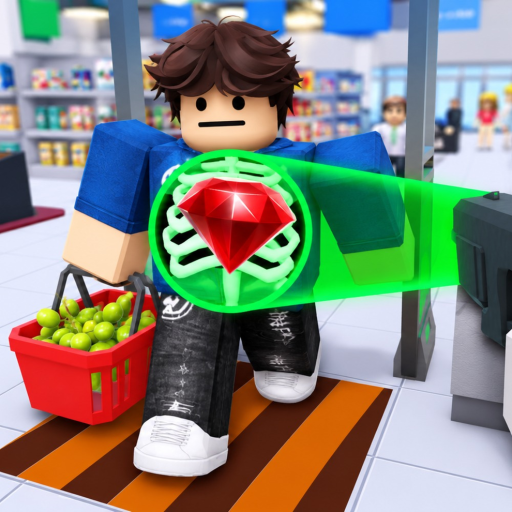
Secure the Supermarket is a Roblox experience by STOP STEALING!!! that puts you in the role of store security. The core fantasy is simple: customers shop, approach the exit, and you decide whether their bags match their receipts. Shoplifters try to slip out with unpaid goods; honest customers expect fast service. You earn Cash for correct decisions, spend it on better gear, and face tougher criminals as your shift intensity grows. The game is inspired by Secure the Airport, but the supermarket setting adds receipt checks and aisle pressure.
This guide walks through your first session on desktop, mobile, tablet, or console. For key bindings, see Controls. For deep receipt rules, see Receipt Scanning.
Before you queue
Open the official experience on Roblox: Secure the Supermarket. Verify the developer name STOP STEALING!!! on the page. There is no separate download — Roblox handles updates automatically.
There are no verified promo codes at launch; ignore random strings from social media until the Codes tracker lists an official one. Progress comes from shifts, not leaked codes.
Understanding your job
You are not running checkout registers in the traditional supermarket sim sense. You are the last line of defense at the exit:
- Customers approach the security lane after shopping.
- You scan or inspect them and review their receipt against visible items.
- If everything matches, you pass them — income and streak bonuses typically follow correct clears.
- If items are missing from the receipt or behavior is suspicious, you stop or detain the customer before they leave.
- Shoplifters may run, fight, or resist — see Catching Shoplifters for chase timing.
The official description promises new supermarket areas [SOON] — early builds may focus on a single zone. Watch Updates for map expansions.
First shift walkthrough
Step 1 — Spawn and orient. After loading, note where the exit scanner sits relative to aisles. Identify UI elements: Cash balance, gear hotbar, and any shift timer. Exact HUD layout may vary by patch.
Step 2 — Let the line move. Early customers are forgiving. Watch one full interaction: receipt popup, item icons, pass/fail buttons. Do not spam click — mis-clicks cost time and may let thieves through.
Step 3 — Compare receipt to cart. Each line on the receipt should correspond to an item the customer carries. Extra items without payment lines are theft flags. Missing scanned items may mean an honest packing mistake — learn the difference in Receipt Scanning.
Step 4 — Handle your first shoplifter. When you flag someone, be ready to move. Some thieves sprint for the door. Basic gear may slow them; upgrades help later. Your first priority is preventing escape, not perfect speed.
Step 5 — Bank your Cash. End-of-shift or continuous earnings feed the upgrade shop. Before buying cosmetics, read Cash & Upgrades for practical first purchases.
Difficulty scaling
STOP STEALING!!! advertises that the more customers you check, the harder the job becomes. Expect:
- Faster customer flow and shorter decision windows
- More sophisticated shoplifters hiding items
- Powerful criminals and a final thief arc in late progression — covered in Bosses & Final Thief
If shifts suddenly feel overwhelming, you may have hit a gear check. Cross-reference the Gear Ranking tier list rather than quitting the session.
Platform notes
The game lists support for Desktop, Mobile, Tablet, and Console. Touch controls use on-screen buttons; controller layouts follow Roblox defaults where not overridden. Unconfirmed bindings are marked on the Controls page — do not assume PC-only keys work on console until tested.
Common beginner mistakes
- Passing without reading — one missed shoplifter wipes more profit than ten slow honest scans.
- Ignoring gear — starter tools work for tutorial pace; mid shifts need upgrades from earned Cash.
- Chasing too far — sometimes securing the exit zone beats a long pursuit that spawns the next customer unattended.
- Skipping electricity or repair mechanics — some builds include store systems that break; failing them may spawn extra chaos (see community notes on Scripts features like auto-repair — using scripts risks bans).
What to do after hour one
Once you can clear ten customers with few errors:
- Specialize in Receipt Scanning speed without losing accuracy.
- Practice Catching Shoplifters with your first upgraded tool.
- Plan income with the Shift Planner tool page.
- Track Roblox Badges & Achievements for long-term goals.
Related pages
- Guides Hub — full index
- Gear database — security equipment stats
- Official Links — game page and trusted resources
Welcome to the floor — keep the receipts honest and the aisles secure.
Frequently Asked Questions
Quick answers to the most common questions.
What is the main goal in Secure the Supermarket?
Stop shoplifters, verify receipts at the exit, earn Cash, upgrade security gear, and eventually defeat the final thief to save the store.
Is Secure the Supermarket the same as Secure the Airport?
It is inspired by Secure the Airport but set in a supermarket with receipt scanning and store security mechanics. Treat them as separate experiences.
Can I play on mobile?
Yes. The official description lists mobile, tablet, console, and desktop support through the Roblox app.
Do I need codes to progress?
No verified codes exist. Progression comes from successful shifts and upgrades purchased with earned Cash.
Why did my shift suddenly get harder?
Difficulty scales with how many customers you process. More checks bring tougher criminals and faster pacing — upgrade gear via Cash & Upgrades.